
WITNESS 1.14.0

David Thorne

Image of Dave Thorne Oner ofDemux Video Services Ltd

This is the first release of WITNESS with some video enhancement functions.

Improve video review with powerful filter enhancements while preserving original clips

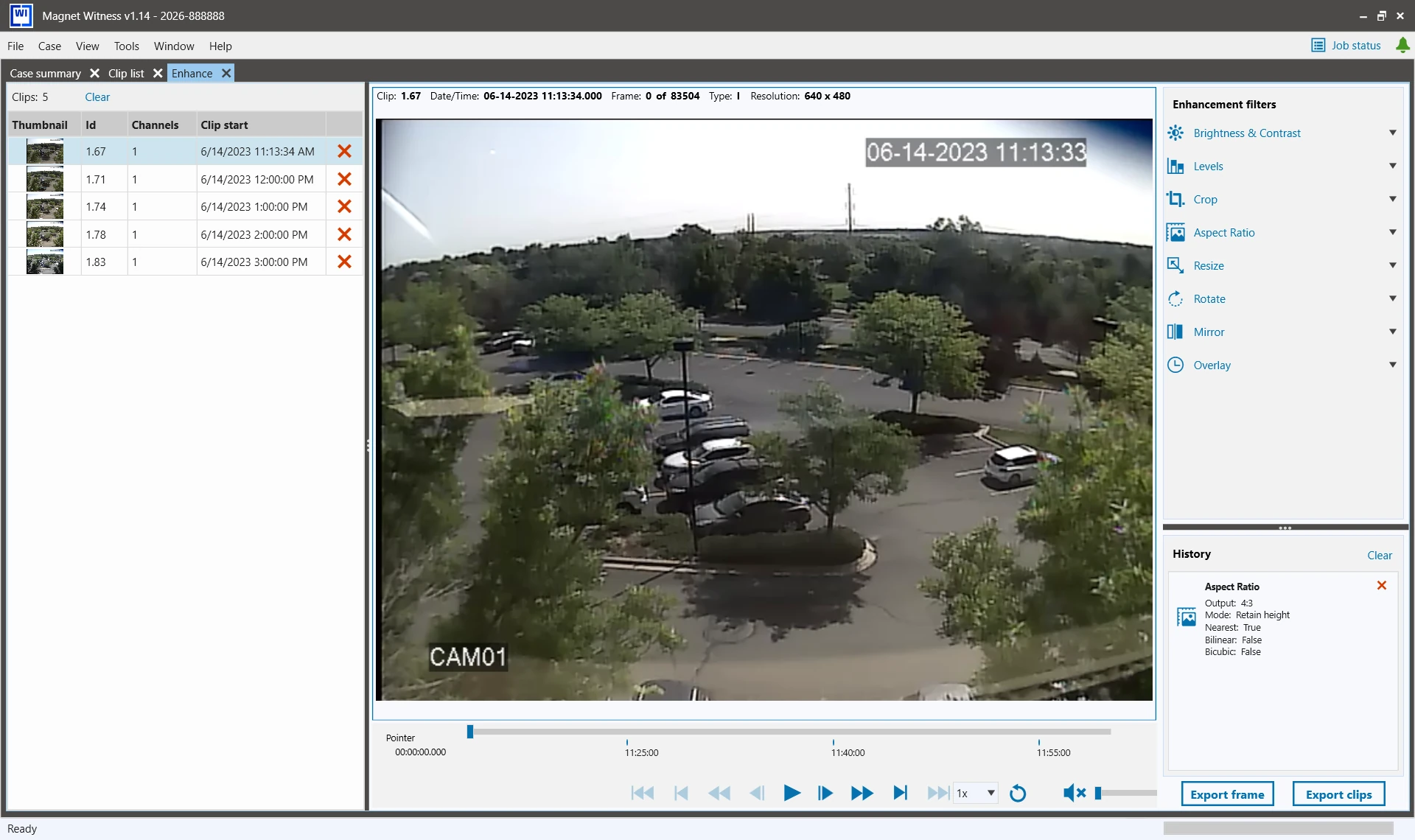
Apply filters to video clips using a non-destructive workflow that preserves evidence. Select one or many clips from the clip list, right click, and select Enhance to open the workflow. These filters provide a consistent and repeatable way to manage clips, add to, and replace clips in the enhancement list while maintaining am unaltered version of the original clips. The Enhancements clip list displays selected video and still clips in the order they're selected from the original clip list or playlist. Details for the clip appear in sortable columns, including Id, Source name, Channels, and a Remove icon. You can apply the available filters to one or many clips in one operation, including:
  • Brightness and Contrast
  • Crop
  • Levels
  • Mirror
  • Resize
  • Rotate
  • Overlay
Magnet WITNESs - Enhance GUI
Note: Overlays can surface date and time information and burn it into outputs to clearly present timing and context.

The filters you apply are tracked in the History panel, and you can adjust them as required at a later time. The player reflects the filters you currently have applied.

After you have applied the filters to your specific need, you can export a still image or transcoded video clips and generate a report on the enhanced content. The export and reporting experience is consistent with the existing workflows for content without enhancements applied, including the ability to retry jobs that were not successfully completed.

Distinguish full-stream and substream clips at a glance with Resolution

After running a clip properties job, the clip’s frame resolution (such as 1920x1080) is captured and displayed in the Resolution column in the clip list. This allows examiners to distinguish full-stream videos from substream clips, helping reduce duplicate exports and streamline review.

New filesystems and file formats

Added support for the following filesystems and file formats:

  • File format improvement: FF-ARC-AVD-001

Fixed Issues

  • Previously, if you applied a clip offset and then created a subclip in certain DVR 24 workflows, you may have received an error message indicating "Error creating player list. Sequence contains no elements" during preview. Now, playback failures are resolved and subclips created after offsets can be previewed as expected. (MMP-1529)
  • Previously, if you tried to output an a 0 (zero)-length export, the information indices for subsequent exports were off by one. Now, the output contains an empty entry for 0-length exports, and subsequent exports are as expected. (MAP-1662)
  • Previously, if a user tried to add a source to the Case Wizard that had already been added, the Next button on the notification incorrectly prompted the user to submit a support request. This fix removes the irrelevant support request option. (MMP-1796)
  • The Case Details pop-up has been resized so that validation warnings, such as duplicate name alerts are fully visible, and no longer cut off. (MMP-1782)
  • Previously, the CLI export did not generate a copy in the reports folder. With this fix, the CLI export saves generated reports to the Cases reports folder. (MMP-1764)

Known Issues

  • In some cases, the export clip list may be missing a thumbnail and resolution. (MMP-1958)
  • When scanning a certain disk images in Witness, the resolution column is not displaying clip resolution values. (MMP-1968)

Previous Releases

You can see previous releases on the WITNESS changelog section here

UPDATE or UPGRADE

If you are a current WITNESS user, please update to Version 1.14.0 to start taking advantage of these new features. If you are still a DVR Examiner user but you would like to upgrade to WITNESS please get in touch with me for your options. We can also supply a trial of WITNESS for you to review.

Demux Video Services Ltd
Blog Posts

Lastest blog posts