Collect live websites, social media and dark-web content with timestamps, metadata and chain of custody preserved, so online evidence stands up in court and investigations.
EVIQUIRE is a forensic-grade web evidence acquisition tool for capturing websites, social media and dark-web content exactly as it appeared at the time of collection. It automatically records timestamps, URLs, metadata and chain of custody, creating legally defensible digital evidence for investigations and legal proceedings.
EVIQUIRE is used by teams who need to collect and preserve web-based evidence reliably:
Online evidence now plays a central role in many investigations. Fraud cases, harassment investigations, corporate disputes, and criminal enquiries often involve websites, social media posts, online marketplaces, or other digital content that can change or disappear without warning.
EVIQUIRE allows investigators to capture online evidence in a structured and defensible way. Instead of relying on screenshots or manual recording, investigators can collect complete web pages together with key contextual information such as timestamps, URLs, and metadata.
This ensures that captured material accurately reflects what was visible online at the time of collection and can be reviewed, analysed, and presented as part of a professional investigative workflow.
Available for Windows, Linux and Mac (coming soon).
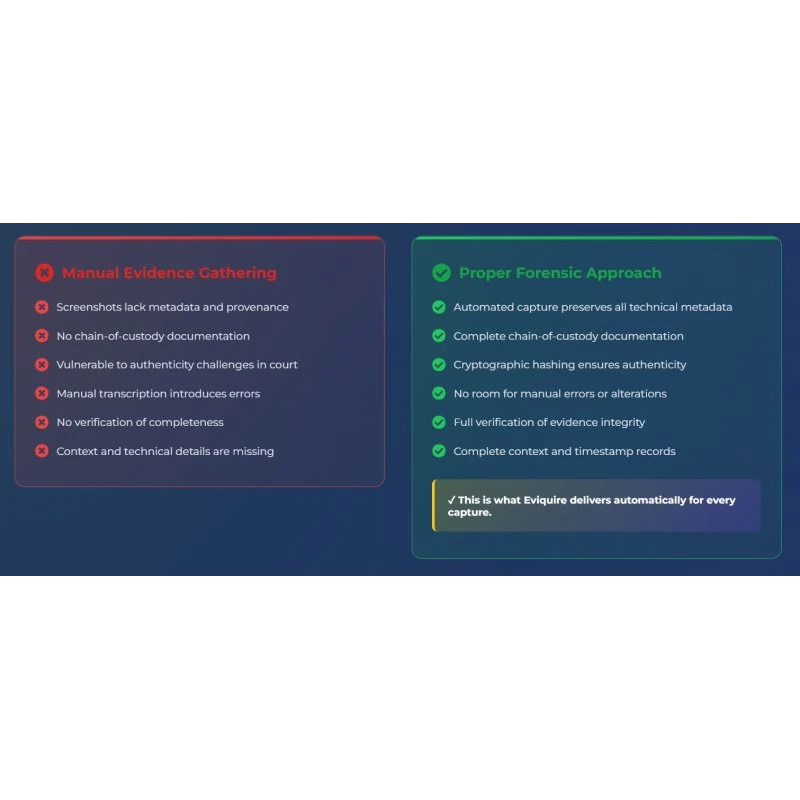
Investigators increasingly rely on online content as part of their enquiries. However, capturing web evidence reliably can be challenging. Websites change frequently, social media posts may be deleted, and screenshots often fail to capture the full context of the information investigators need.
EVIQUIRE provides a structured approach to web evidence acquisition that helps investigators capture and preserve online content quickly and defensibly. By recording contextual information alongside the captured material, investigators can demonstrate the authenticity and provenance of the evidence.
This allows investigative teams to work more efficiently, document their findings clearly, and present online evidence in a way that supports professional investigations and legal proceedings.
Q: What operating systems does EVIQUIRE run on?
A: EVIQUIRE natively runs on both Windows and Linux, and is also available as a Cloud SaaS version requiring no installation, compatible with any HTML5 browser.
Q: Can EVIQUIRE run inside a virtual machine?
A: Yes. EVIQUIRE can run inside a virtual machine to comply with digital forensic best practices.
Q: Is there a limit on how many cases I can create in EVIQUIRE?
A: No. Regardless of the plan selected, you can create unlimited cases, acquisitions, and evidence items in EVIQUIRE.
Q: Can I use my EVIQUIRE licence on more than one computer?
A: Yes. EVIQUIRE offers a floating subscription, letting you use your personal licence on as many computers as you want, as long as it's only in use on one at a time.
Q: Is there a free version of EVIQUIRE?
A: Yes. EVIQUIRE offers a Community Licence, a free web forensic tool for the wider community.
Q: How do I organise my cases in EVIQUIRE?
A: The Case Manager is where you organise all your cases, acquisitions, and evidence in one place.
Q: Does EVIQUIRE generate forensic reports automatically?
A: Yes. Every time a case, acquisition, or piece of evidence is closed, EVIQUIRE automatically creates a forensic report.
Q: Can I review cases created by someone else in EVIQUIRE?
A: Yes. The Case Viewer lets you import and review cases created by others, or by you on a different machine.
Q: Is EVIQUIRE compliant with recognised forensic standards?
A: Yes. EVIQUIRE creates forensic packages and reports compliant with the ISO/IEC 27037:2012 standard for the identification, collection, and preservation of digital evidence.
Q: Does EVIQUIRE maintain a chain of custody?
A: Yes. Throughout the entire acquisition, EVIQUIRE diligently maintains the digital chain of custody automatically.
Q: How does EVIQUIRE verify evidence hasn't been tampered with?
A: All evidence in EVIQUIRE is hashed with three different algorithms, avoiding any realistic possibility of a hash collision going undetected.
Q: When is evidence timestamped in EVIQUIRE?
A: Each piece of evidence is timestamped in real time as it is captured, not retrospectively at the end of the acquisition session.
Q: Does EVIQUIRE use blockchain to timestamp evidence?
A: Yes. EVIQUIRE timestamps each forensic package created across multiple blockchains, using the latest technologies to keep evidence timestamping fast and scalable.
Q: Does EVIQUIRE record the acquisition session itself?
A: Yes. The entire acquisition session is screen recorded, creating a strong, presentable piece of supporting evidence.
Q: Does EVIQUIRE capture network traffic during acquisition?
A: Yes. Network traffic during the acquisition session is fully captured, strengthening the final evidence package.
Q: Does EVIQUIRE keep a log of what the investigator did during a session?
A: Yes. EVIQUIRE documents all user interactions during a session, maintaining an auditable activity log for accountability.
Q: Can EVIQUIRE produce a printable version of a screenshot?
A: Yes. Each screenshot piece of evidence can be printed in A4 format to facilitate presentation of the evidence.
Q: What if a single screenshot isn't enough to capture a long web page?
A: EVIQUIRE's Pageshot feature captures the full content of a long page beyond what a single screenshot could show.
Q: Can EVIQUIRE automatically scroll through a page while capturing it?
A: Yes. Smart Page Auto-scroll automatically scrolls through social media feeds or infinite-scrolling pages while acquiring the content.
Q: Does EVIQUIRE preserve a web page's underlying source code?
A: Yes. Each web evidence capture has its source code exported and saved in Web Page Archive format (MHTML).
Q: Can EVIQUIRE capture more than one website at once?
A: Yes. The Split Screen feature lets you capture multiple websites simultaneously, or view how the same site renders differently under different user agent settings.
Q: What is EVIQUIRE used for?
A: EVIQUIRE is a forensic web capture tool used by investigators to preserve online evidence, including websites, social media posts, and dark-web content, exactly as it appeared at the time of capture. It records timestamps, URLs, and source metadata automatically to create legally defensible digital evidence.
Q: Who uses EVIQUIRE?
A: EVIQUIRE is used by digital forensic analysts, OSINT investigators, law enforcement agencies, legal professionals, HR teams, and corporate investigation units who need to capture and preserve online content as part of an investigation or legal proceeding.

If you require any changelogs from older dates which aren't currently visible, please contact info@demux.co.uk.
This release introduces detailed cookie and TLS certificate evidence, a unified acquisition timeline, application-level HAR capture, historical website comparison, local evidence reports, social metadata collection, individual evidence-package downloads, and portable distribution packages. It also strengthens acquisition recovery, integrity verification, video processing, automated capture, and local recorder authentication.
• Unified Acquisition Timeline: Review navigation, evidence creation, downloads, video activity, cookies, and certificate observations in a chronological view with filters and artifact previews.
• Deep Cookie Collection: Optionally preserve detailed cookie metadata and lifecycle events. Dedicated live and review panels provide domain filtering, search, and event details.
• TLS Certificate Evidence: Capture observed certificate chains, subjects, issuers, fingerprints, validity periods, and connection status. Inspect certificate observations in dedicated timeline and review panels.
• Application Network HAR: Optionally capture browser-observed requests, responses, headers, and bodies separately from system-wide packet capture. The HAR viewer includes sorting, filtering, timing information, and raw-response downloads.
• Historical Website Comparison: Search Wayback Machine and Arquivo.pt snapshots using date ranges, open archived pages, and compare historical content alongside the current page.
• Local Evidence Reports: Generate local PDF and JSON evidence reports alongside existing cloud reports, including captured context, investigator identity, comments, hashes, and supported previews.
• Report Customization: Configure acquisition and local evidence report branding independently. Preview reports inside the application, save previews, or open them in an external PDF viewer.
• Social Metadata Collection: Preserve supported Facebook, Instagram, and TikTok post or profile metadata from observed page content and captured responses. A read-only Social Info tool displays available information for the current page.
• Case File Attachments: Add supporting files with comments, original filenames, and recorded hashes. Attachments are included in case exports, with timestamp and blockchain receipt details available where generated.
• Individual Evidence Downloads: Save the original evidence ZIP from Case Manager using the Evidence Details download button or the evidence-table context menu. Packages can be retrieved from acquisition archives and closed cases, including password-protected cases, without modifying the originals.
• Acquisition and Case Integrity Verification: Check acquisitions and closed cases against recorded hashes and file inventories. View progress, per-record results, and detailed findings without modifying original evidence.
• Automatic Cookie Consent: An optional acquisition setting handles supported Accept All or Reject All controls, including Google, Facebook, Instagram, YouTube, TikTok, and Reddit. Actual consent clicks are recorded in Chain of Custody.
• Windows Acquisition Protection: During acquisition and finalization, request protection against ordinary shutdown, restart, and sign-out, and prevent automatic idle sleep. Windows policy and forced shutdown can override these requests; manual Sleep/Hibernate and screen locking remain available.
• Chromium NetLog: Optional browser-network diagnostic capture supplements existing network evidence and acquisition reporting.
• Acquisition Information Panel: View collected evidence, file sizes, total disk usage, and available disk space during an acquisition.
• Portable Packages: Added a Windows portable ZIP and an Ubuntu AppImage. Required application runtimes are bundled, including app-local Visual C++ libraries on Windows and FFmpeg tools plus Firebird on Ubuntu.
• Expanded Video Playback: Added direct AV1 review playback and improved HEVC compatibility using the matching FFmpeg multimedia runtime, without converting the original evidence file.
• Timestamp Processing: FreeTSA and blockchain operations run in parallel with bounded waits and explicit failure handling. Realtime evidence timestamping can be configured independently of final acquisition timestamping.
• Evidence Preservation: Timestamp or finalization failures no longer automatically prevent evidence packaging. Recovery handling preserves collected material and reports incomplete processing.
• Domain Evidence Caching: WHOIS, robots.txt, and sitemap results are cached within an acquisition to avoid unnecessary repeated requests.
• Video Download Metadata: Downloaded media and companion artifacts receive clearer summaries, including available titles, descriptions, subtitle information, filenames, and hashes.
• macOS Packaging: Corrected bundled media dependency paths and signing order, and added checks that packaged media libraries can load without developer-machine search paths.
• Evidence Review: Improved PDF, MHTML, text, image, and video previews, with sortable file lists, original-file downloads, clearer evidence details, and resizable columns.
• Acquisition Settings: Display the automatic cookie-consent mode in acquisition details. Local acquisition reports include selected recording, timestamp, network, collection, consent, and browser settings; Chain of Custody also records the user agent and content language.
• Report Footers: Local evidence reports include page counts and evidence/acquisition identifiers, while redacted reports omit those identifiers.
• Display Time Zones: Added configurable display time zones with GMT offsets and clearer UTC labeling, while retaining UTC evidence records.
• Integrated Progress: Acquisition and evidence-processing progress is displayed in the Chain of Custody footer.
• Case Management: Improved attachment tables, comments, file-size labels, timestamp dialogs, blockchain previews, and integrity-result presentation.
• Interface Consistency: Refined menus, tooltips, dialog sizing, read-only Copy actions, window controls, and translations across supported interface languages. Autoscroll menu colors distinguish advisory states from disabled actions.
• Improved Facebook, Instagram, YouTube, and TikTok comment expansion, including Instagram load-more controls and YouTube Shorts reply panels.
• Smart element autoscroll now selects direction by remaining content. Facebook Reel comment panels can be detected before they become scrollable.
• Fixed autoscroll Stop getting stuck during loading or screenshot waits. PageShot PDFs now fill A4 pages continuously instead of introducing unnecessary blank space.
• Improved report investigator names, comments, video titles, Unicode text, logo sizing, and table layout across page breaks.
• Fixed recorder logging failures that could crash the recorder when its log file could not be opened.
• Hardened acquisition finalization, archive creation, extraction cancellation, database writes, and partial-acquisition recovery.
• Preserved original evidence archives during review and improved handling of missing, unreadable, or legacy acquisition metadata.
• Added Windows crash diagnostic packages containing relevant dumps, logs, and version information. Diagnostic files remain separate from evidence and are not uploaded automatically.
• Improved browser shutdown, pending authentication cancellation, popup handling, and macOS acquisition startup.
• Added deadlines for PageShot scroll and content-size responses; timed-out captures finalize frames already collected instead of waiting indefinitely for those responses.
• Synchronized PageShot image production and the background PDF writer so queued frames are drained before completion, addressing completion hangs and concurrent image-list access.
• Scrollable-element discovery is passive and does not move page content while identifying capture targets.
• Fixed visible scroll containers being incorrectly rejected as clipped, using browser hit-testing without moving page content.
• Initial screenshots and social metadata are frozen before autoscroll or comment expansion changes the page.
• Capture guards stop interrupted operations when the selected page or element changes, while preserving material already captured.
• Facebook and Instagram modal detection prevents page autoscroll from capturing the background feed while keeping supported element capture available. All qualifying visible scroll regions are selectable, including nested comment lists whose content does not yet overflow, instead of only the largest container.
• Removed third-party favicon lookup requests; browser tabs use the website’s icon or a local fallback.
• Social metadata, comment expansion, and consent automation depend on supported website structures; website changes may require updated rules.
• HAR and NetLog can contain sensitive session information and should be enabled and shared deliberately.
• The Ubuntu AppImage requires a compatible Linux environment and X11/XWayland support. Packet capture still requires host-installed TShark and configured dumpcap permissions.
• Consistent scaling across multiple monitors remains recommended. macOS support remains beta.
No bugs have been discovered in previous versions that require a specific mention in a Court of Law.
Windows 10/11, 64-bit; Ubuntu 24.04, x86-64; macOS beta where the corresponding build is provided. Other Linux distributions require separate validation.
Minimum Required Resources
4 CPU cores and 8 GB RAM. Larger or multi-day acquisitions require additional CPU, memory, and evidence-storage capacity.
Here is what’s new in build version 5.0.6110.13, August 5th, 2026
This release expands Eviquire’s cross-platform capabilities with the introduction of a beta version for macOS, a reworked FFmpeg-based recording engine, enhanced application-specific audio and window capture, improved mobile acquisition support, and modernized Mail and Mobile acquisition interfaces.
The release also introduces substantial improvements to page-shot acquisition, autoscroll reliability, Evidence Review, yt-dlp processing, multi-monitor handling, and deployment packaging across Windows, Ubuntu, and macOS.
When multiple monitors are used, consistent display scaling across all monitors is recommended. Different scaling values may affect capture coordinates, click indicators, or visual alignment during recording and page-shot acquisition.
For any bug or feature that is no longer working, including changes affecting supported social media platforms, please contact Eviquire Support through the in-application support function or by email at support@ricta.io.
No bugs have been identified in previous versions that require specific disclosure in a Court of Law.
Here is what’s new in build version 5.0.6110.2, May 10th, 2026
This release introduces major improvements to evidence review workflows, acquisition reliability, deployment packaging, and browser capture stability. The update also delivers a new portable case viewer package, enhanced metadata handling, improved chain-of-custody presentation, and multiple UI/UX refinements across both desktop and cloud environments.
In the event of any visual recording issues, if multiple monitors are used, ensure that display scaling is set consistently across all monitors.
In case of any bug or feature not working anymore (Social Media), please contact support using the in-app support system or via email at support@ricta.io
No bugs have been discovered in previous versions that require a specific mention in a Court of Law.
This release introduces major advancements in web acquisition capabilities, significant stability improvements, and multiple bug fixes, further strengthening Eviquire’s position as a forensic-grade web evidence acquisition platform aligned with industry best practices.
Introduction of a new Crawler mode enabling automated forensic acquisition of all pages linked from the current page
Operates one level deep and restricts acquisition to the same domain
Designed for websites with sequential navigation (e.g. classifieds, listings)
Allows users to define the “Next” navigation element for automated acquisition
New Clicker + Crawler hybrid mode
Combines navigation automation with link discovery for deeper acquisition scenarios
UX/UI Improvements Applied
Bug Fixes
Stability Fixes
Browser & Rendering Fixes
Improved web page loading behavior before recording start
Known Bug:
In the event of any visual recording issues, If multiple monitors are used, ensure that the display scaling is set consistently across all monitors.
In case of any bug or feature not working anymore (Social Media) please write our support using the in-app support or via email at support@ricta.io
Forensic bugs:
No bugs have been discovered in previous versions that require a specific mention in a Court of Law.
New Features Implemented
Generic Improvements Applied
UX/UI Improvements Applied
Bug Fixes
Stability Fixes
Cloud & Acquisition Fixes
Browser & Rendering Fixes
Known Bug:
In case of any bug or feature not working anymore (Social Media) please email support using the in-app support or via email at support@ricta.io
Forensic bugs:
No bugs have been discovered in previous versions that require a specific mention in a Court of Law.
Download Link:
Windows Installer
Supported Operating Systems:
Minimum Required Resources:
4 CPU cores and 8 GB RAM
Recommended Configuration (for multi-day acquisitions only):
6 or more CPU cores and 16 GB RAM (or greater available system resources)
New Features implemented:
Generic Improvements applied:
UX/UI Improvements applied:
Bug Fixes:
Known Bug:
In case of any bug or feature not working anymore (Social Media) please write our support using the in-app support or via email at support@ricta.io
Forensic bugs:
No bugs have been discovered in previous versions that require a specific mention in a Court of Law.
Here is what's new in build version 4.5.6900.05, Oct 16th, 2025
New Features implemented:
Generic Improvements applied:
UX/UI Improvements applied:
Bug Fixes:
Known Bug:
In case of any bug or feature not working anymore (Social Media) please write our support using the in-app support or via email at support@ricta.io
Forensic bugs:
No bugs have been discovered in previous versions that require a specific mention in a Court of Law.
